Snowflake is a SQL data warehouse you rent by the second. You do not install it, you do not size a
cluster, and you do not have a DBA tuning it. You create an account, point a client at it, and write
SELECT. What makes it worth a sixteen-lesson track is not that it is hosted — plenty of
databases are hosted — but one structural decision the rest of this track keeps coming back to:
storage and compute are separate, and you pay for them separately.
The problem it was built for
Analytical work has an awkward shape. Most of the day nobody is querying. Then the daily load runs, or a dashboard refreshes for forty people at once, or an analyst asks a question that touches two years of history. Demand is spiky by an order of magnitude, and it is spiky in different directions at once — a heavy write job and a heavy read job frequently want the machine at the same moment.
The two older answers both handle that badly.
A relational database like Postgres keeps data and processing on the same machine. That is exactly what you want for an application — a row you just wrote is already on the disk the next query reads. But it means capacity is one number. Scale up for the worst hour and you pay for it during the twenty-three quiet ones, and the loading job still competes with the dashboards for the same CPU.
Hadoop-era systems split the work across many machines but kept data on those machines' disks, so growing storage meant adding compute you did not need, and shrinking compute meant moving data. They also asked you to run them, which turned out to be most of the cost.
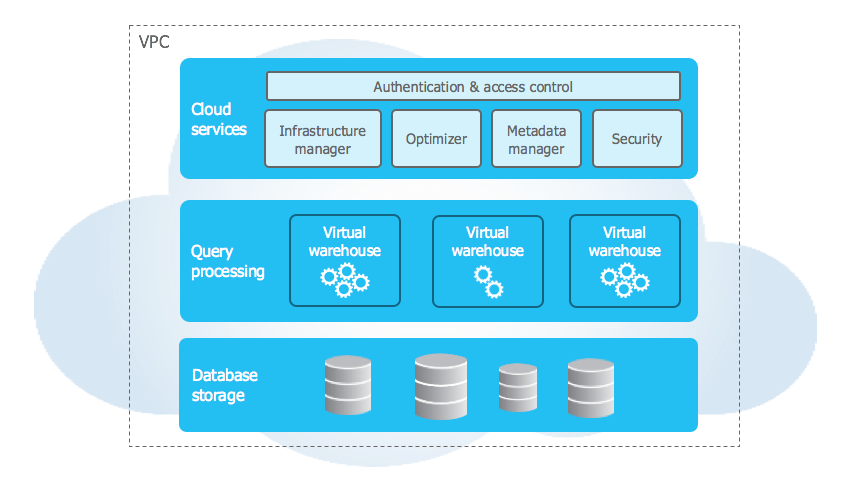
Snowflake's answer is to put the data in cloud object storage — S3, Azure Blob, GCS — and treat compute as a thing you switch on when a query arrives and switch off when it finishes. Storage grows without touching compute. Compute resizes without touching storage. And because the data is not attached to any particular machine, you can point several independent compute clusters at the same table simultaneously, at full speed, without them contending.
That is the whole idea. Everything else in this track is a consequence of it.
What that gets you in practice
Four things follow directly, and each one is a lesson later in the track.
Workloads stop fighting. Give the loading pipeline its own warehouse and the BI tool another, and a slow load cannot make a dashboard slow. They are different machines reading the same files.
Scale is a one-line change. Resizing a warehouse is an ALTER
statement that takes effect on the next query. There is no rebalancing and no downtime, so sizing
becomes something you adjust rather than something you commit to.
Copies are free. Because a table is a set of immutable files plus metadata describing which files belong to it, a clone is a new set of metadata pointing at the same files. Copying a production database for a dev branch costs nothing until somebody changes something.
The past is still there. Updates never overwrite files; they write new ones. So
querying a table as it was before a bad UPDATE is a normal query with an extra clause,
not a restore from backup.
What you pay for
Three meters, and it helps to keep them separate in your head.
| Meter | Charged on | Runs when |
|---|---|---|
| Compute | Credits per second a warehouse is running | You query, load, or otherwise use a warehouse |
| Storage | Average compressed terabytes per month | Always |
| Serverless | Credits, per feature | Snowpipe, serverless tasks, automatic clustering and similar run without a warehouse of yours |
In almost every account, compute dominates — usually by a wide margin. Storage is compressed and priced like object storage, which is to say it is rarely the thing anyone notices on an invoice. This matters because it tells you where to look when a bill surprises you, and the answer is nearly always a warehouse that was left running. Lesson 15 is about exactly that.
Credit consumption is fixed and public — an X-Small warehouse burns one credit per hour it runs, and each size up doubles that. What a credit costs in money depends on your edition, your cloud and your region, so this track quotes credits and never dollars. The current dollar figures live on Snowflake's pricing page.
Your first query
Every account is created with a shared database called SNOWFLAKE_SAMPLE_DATA
already attached, holding the TPC-H benchmark data at several sizes. You do not load it, you do not
pay to store it, and it is there the minute your trial account exists.
This track uses it for every query lesson, so you can follow along from a free trial without loading a byte. Set your session context and ask it something:
USE WAREHOUSE COMPUTE_WH;
USE DATABASE SNOWFLAKE_SAMPLE_DATA;
USE SCHEMA TPCH_SF1;

SELECT c_mktsegment,
       COUNT(*)              AS customers,
       ROUND(AVG(c_acctbal)) AS avg_balance
FROM   customer
GROUP BY c_mktsegment
ORDER BY customers DESC;
Five rows come back, one per market segment, each covering roughly a fifth of the
150,000 customers in TPCH_SF1:
| C_MKTSEGMENT | CUSTOMERS | AVG_BALANCE |
|---|---|---|
| MACHINERY | 30,142 | 4,504 |
| AUTOMOBILE | 30,003 | 4,510 |
| BUILDING | 30,142 | 4,489 |
| FURNITURE | 29,968 | 4,517 |
| HOUSEHOLD | 29,745 | 4,498 |
Result shapes throughout this track are illustrative — run the query and read your own numbers. TPC-H is generated data, so the segments come out close to evenly split, which is worth knowing before you draw a conclusion from a chart of it.
What is more interesting is what you did not have to do. Six columns of thinking, 150,000 rows of scanning, and there was no index to create, no statistics to gather and no partitioning scheme to choose. That absence is not laziness on Snowflake's part — lesson 2 explains what replaced them, and it is also the reason the same query over a hundred times as much data is not a hundred times the work.
When it is the wrong tool
Snowflake is an analytical warehouse. It is genuinely bad at things that are not that, and being clear about it now saves an expensive discovery later.
- It is not an application database. Single-row lookups by primary key take tens or hundreds of milliseconds because there is a warehouse to wake and a query to compile. Your web app's user table belongs in Postgres.
- It does not enforce most constraints. You can declare a primary key and a
foreign key; Snowflake records them for query optimisation and tooling, and does not check them.
Only
NOT NULLis enforced. Uniqueness is your loader's job. - It is not for high-frequency small writes. Inserting one row at a time works and is a bad idea — each statement writes new files. Batch, or use the streaming paths in lesson 8.
- Idle cost is real if you are careless. A warehouse with auto-suspend disabled bills for every second it is up, whether or not anybody queried it.
The shape it fits is: data arrives in batches or streams from somewhere else, several teams query it in ways nobody predicted, and the volume is larger than one machine would enjoy.
How this track is arranged
Sixteen lessons, in the order you would actually meet these things while building something.
- Introduction — this page.
- Architecture — the three layers, micro-partitions, and the caches.
- Getting started — account, Snowsight, and connecting from code.
- Virtual warehouses — sizing, auto-suspend, and splitting workloads.
- Databases, schemas and tables — the object model and the daily DDL.
- Data types — the short list, and the three that cause bugs.
- Loading data — stages,
COPY INTO, and file sizing. - Snowpipe — continuous loading and how its billing differs.
- Semi-structured data —
VARIANT, JSON, andFLATTEN. - Querying data — CTEs, window functions and
QUALIFY. - Query performance — the Query Profile, pruning, spilling, clustering.
- Time Travel and cloning — undoing mistakes and branching data.
- Streams and tasks — change tracking and scheduling, without a new tool.
- Access control — roles, grants, and future grants.
- Cost management — where credits go and how to cap them.
- In production — environments, CI, service accounts, monitoring.
Lessons 1 to 4 are worth reading in order; after that they mostly stand alone. Next up: the architecture, because the reason there was no index to create above is the reason most of the rest of this works.